Shoot Golden NZ
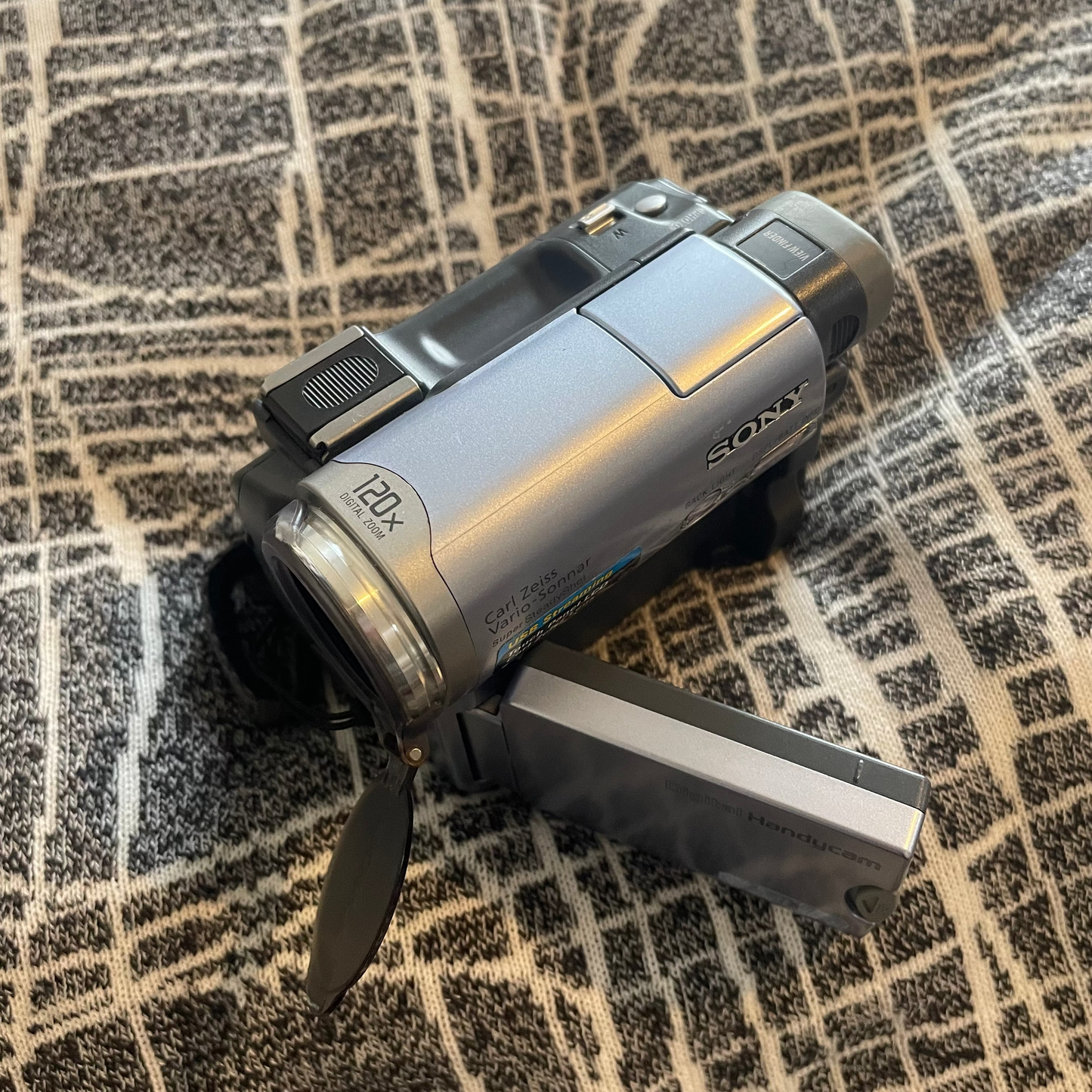
Sony DCR-TRV14E Handycam (Full Kit)
Sony DCR-TRV14E Handycam (Full Kit)
Couldn't load pickup availability
The Sony DCR-TRV14E is an excellent choice for a lo-fi, vintage aesthetic, and it is highly beginner-friendly for anyone looking to get into retro videography.
Here is why it fits the "vintage vibe" perfectly and how easy it is to operate.
Why It’s Great for a Lo-Fi Vintage Aesthetic
The modern appeal of this camcorder lies exactly in its technical limitations compared to modern smartphones.
- Authentic Textures: Unlike smartphone apps that mimic old film, this camera records to actual magnetic tape (MiniDV). It creates genuine interlaced video lines, color bleeding, and tape artifacts that digital filters cannot perfectly replicate.
- Early 2000s Look: It captures video in a 4:3 aspect ratio and standard definition (PAL format). This instantly gives your footage a nostalgic, documentary-style look reminiscent of early skate videos, home movies, and MTV-era aesthetics.
- The "NightShot" Mode: This camera features Sony’s famous infrared NightShot mode. It allows you to shoot in total darkness, casting a monochrome, green-tinted glow over the footage that has become highly popular in modern lo-fi music videos and night-time street videography.
- Optical Artifacts: The Carl Zeiss lens handles light flares, highlights, and motion blur in a soft, organic way that looks distinctly "analog" compared to the hyper-sharp, digitally smoothed video of modern phones.
Is It Easy for Beginners?
Yes, for shooting; but it requires patience for transferring. The camera itself is incredibly user-friendly, but working with old media comes with a slight learning curve.
The Easy Parts (Shooting)
- Point-and-Shoot Simplicity: You can pop in a tape, switch it to "Auto" mode, and start recording immediately. The camera handles focus and exposure for you.
- Touchscreen Interface: For an early 2000s device, having a touchscreen makes navigating menus and changing settings surprisingly intuitive for modern users.
- Compact Ergonomics: It is small, lightweight, and designed to be held comfortably in one hand with a physical zoom rocker right under your index finger.
- ⚠️ The Challenging Parts (Tapes & Digital Transfer)
- Real-Time Capture: You cannot simply plug in an SD card to copy files. To get your footage onto a computer, you have to play the tape from start to finish while recording it into your software (e.g., 60 minutes of footage takes 60 minutes to transfer).
- Connection Hardware: The camera relies on i.LINK (FireWire) for the highest quality transfer. Modern computers do not have FireWire ports, so you will need a chain of adapters (like FireWire to Thunderbolt) or a dedicated analog-to-USB capture card to get the video onto your laptop.
To get that authentic, early-2000s vintage look onto social media, you have to bridge the gap between old magnetic tape technology and modern Apple devices.
Because this model records to physical MiniDV tapes, you cannot transfer footage straight to an iPhone in one step. There is no wireless feature or direct cable link that works with phones.
The easiest workflow is a two-step process: capture the footage onto your Mac first, and then send it to your iPhone.
What type of format does this model record onto and can it take sd memory card?
The Sony DCR-TRV14E records video onto MiniDV tapes, which is a physical magnetic tape format.
To answer your second question: No, this camera cannot take a standard SD memory card.
Here is what you need to know about how this model handles storage:
- Video Storage: It relies entirely on small, cassette-like MiniDV tapes to record video. It does not have a built-in memory card slot for video recording, and it cannot record video onto any digital card.
- No Memory Stick Slot either: While some slightly higher-end Sony models from that exact same era featured a slot for Sony's proprietary "Memory Stick" (to take low-resolution still photos), the DCR-TRV14E does not have this feature. It is a tape-only model.
Where to find media today
Because you must use physical tapes, you will need to source MiniDV cassettes. They are no longer manufactured by Sony, but you can easily buy brand-new, unused "new old stock" tapes in multi-packs on our website. Keep in mind this model is sold with a new MiniDV cassette and is included in your kit :)
The Sony DCR-TRV14E is lowkey a cheat code for the vintage aesthetic. iPhone cameras do way too much with AI now, making videos look clinical and boring. This camera is the exact opposite. It's just pure, raw nostalgia.
Here is why it's all over the feed right now:
- Real tape energy: Fake TikTok filters look tacky. This records to actual MiniDV tape, so you get 100% authentic color bleeding, motion blur, and glitch textures.
- The boxy 4:3 crop: It shoots in a square format like an old TV. When you drop it into a vertical Reel or TikTok, those black borders instantly make your streetwear fits or dump vlogs look elite.
- NightShot goes crazy: You can literally film in pitch black. It turns everything into that ghostly, green-tinted infrared look that is perfect for late-night raves or underground music videos.
- Romanticises your life: You can't just spam the record button. Because tape is limited, you actually think about what you’re capturing. It turns your clips into a literal time capsule.
Alright, let's break down how to get your video from the camera onto your Mac and looking elite on the feed
Here is exactly what those two options mean:
1. The Mac Adapter Setup (Getting the video off the camera)
Since this camera is from the early 2000s, it doesn't have a modern plug or an SD card. To link it to your Mac, you need a little hardware chain.
- You plug the camera's original colored cables (red, white, yellow) into a cheap RCA-to-USB capture card (you can find these for like $15–$30 on Amazon).
- Then, you plug that USB into your Mac (using a USB-C adapter if your Mac only has the small ports).
- You hit play on the camera, hit record on your Mac's QuickTime player, and boom—your tape is now a digital file.
2. CapCut Hacks (Making the footage look even better)
Once the video is on your phone or Mac, CapCut helps you lean into that lo-fi vibe.
- The 4:3 Border: Instead of cropping the video to fit the whole screen, you keep the original square box and add blurry or black borders on the sides. It instantly gives indie film energy.
- Color Grading: You can pull down the contrast, boost the shadows, and add a tiny bit of warmth to make it look less like standard video and more like a vintage movie.
- Audio Texture: You can add a subtle "tape hiss" or vinyl crackle sound effect in the background so it sounds as retro as it looks.
- Keep it Chill: Store your camera in a cool, dry spot. Avoid super hot places (like a parked car).
- Save the Battery: If you’re taking a break from shooting for a few weeks, pop the batteries out to protect the inside.
- Protect the Aesthetic: Grab a small camera case. Tossing it loose into your everyday bag can scratch it up, so protect it from knocks to keep it running perfectly.