Shoot Golden NZ
Sony Cybershot DSC-P43 Digital Camera (Colour Chrome)
Sony Cybershot DSC-P43 Digital Camera (Colour Chrome)
Couldn't load pickup availability
The Sony Cyber-shot DSC-P43 delivers an authentic early-2000s "digicam" aesthetic that rejects the hyper-processed, AI-enhanced look of modern smartphone photos.
The Sony Cyber-shot is the ultimate Y2K vibe right now. Here is why it’s iconic:
- iPhone cameras are too perfect: Phone AI makes photos look clinical. The Cyber-shot delivers raw, grainy, low-res images with that chaotic, blown-out flash look that looks amazing on your feed
- Guarding the attention span: You can’t get a TikTok notification or text on a 2004 camera. It keeps you present, and waiting to transfer the pics later makes the reveal feel like opening a present
- It’s a fashion accessory: Rocking a silver vintage digicam fits the streetwear aesthetic perfectly alongside baggy jeans and wired headphones
- Pop culture energy: It matches the iconic, candid paparazzi and party vibe of the early 2000s
The Y2K Aesthetic and Low-Resolution Charm
- CCD Sensor Colors: Older cameras use a CCD sensor instead of modern CMOS chips, rendering punchy flash lighting, deep shadows, and unique color tones that mimic film
- No Smart Processing: Photos aren't automatically smoothed, sharpened, or altered by built-in algorithms, giving pictures a raw and nostalgic quality
- The Direct Flash Look: Using the built-in flash creates the classic, slightly overexposed party snapshot vibe popular on social media
Physical Retro Appeal
- Pocket-Sized Simplicity: Released in 2004, the 4.1-megapixel DSC-P43 is small, lightweight, and powered by simple AA batteries.
- A Break From Screens: Using a dedicated point-and-shoot camera lets younger users stay present at social events without the distractions, texts, and notifications of a smartphone.
This camera is a vibe and literally foolproof to use. It's pure point-and-shoot: no annoying settings, no AI trying to smooth out your skin, just vibes.
But because it dropped in 2004, it has zero Bluetooth or Wi-Fi. It uses Sony’s vintage Memory Stick (not a regular SD card), so you have to do a quick old-school workaround to get your content onto your feed.
Here is exactly how to move your photos and videos to your tech:
📱 Transferring to iPhone or Android
Skip the apps and go straight to the source.
- Grab a Multi-Card Reader: Buy a cheap USB-C "All-in-1" card reader online. Just make sure the description says it fits a Memory Stick (MS).
- Plug and Play: Take the card out of the camera, pop it into the reader, and plug that straight into your phone’s charging port.
- Import: On an iPhone, open the Photos app and hit the "Import" tab that pops up in the corner. On Android, just open your Files app to find them.
💻 Transferring to a MacBook
Macs make the vintage aesthetic super easy to download.
- The Reader Method: Plug that same USB-C multi-card reader into your Mac. Open Finder, click the external drive, open the DCIM folder, and drag your files over.
- The Cord Method: If you have the original Sony cable, plug it into the camera and your Mac (you might need a standard USB-A to USB-C adapter). Turn the camera on, and it acts just like a flash drive.
What you need to power up and store your shots:
🔋 The Battery: Standard AAs
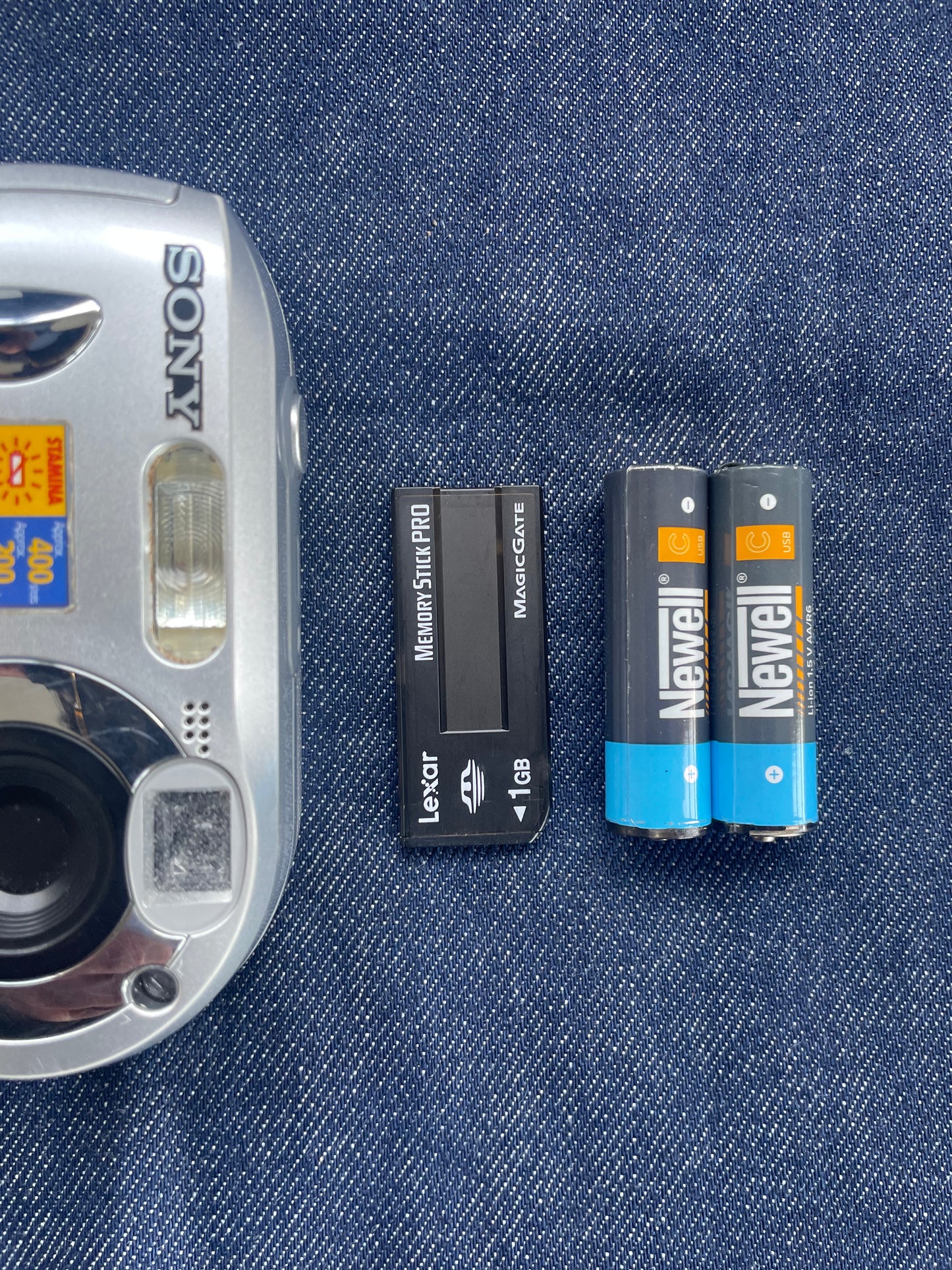
It runs on 2 normal AA batteries.
- The Catch: Don't use cheap disposable ones—old digicams will drain them in five minutes
- The Move: Buy rechargeable NiMH AA batteries (like Panasonic) They last way longer and save you money
- 💾 The Memory Card: Sony Memory Stick
This camera hates normal SD cards. It only takes Sony's vintage Memory Stick or Memory Stick PRO (the long ones that look like chewing gum).
Which Memory Card Should I buy?
- Stay Under 1GB: The camera is too old to read massive cards. Stick to 256MB, 512MB, or 1GB max. (Don't worry, 512MB still holds hundreds of low-res aesthetic pics).
- The "Duo" Hack: If you accidentally buy a short Memory Stick Duo, it's fine! You just need a cheap full-sized Memory Stick adapter to make it fit.
Here is your exact local shopping list to get this camera up and running in NZ without waiting weeks for shipping:
🔋 1. Rechargeable AAs (Instore)
Walk into any of these major chains to grab your power source today.
- PB Tech: Cheapest option. Grab a Panasonic Eneloop AA 4-Pack for about $22
- Noel Leeming: They have Eneloops for $39, or a bundle with the wall charger for $54
- The Warehouse/Bunnings: Pick up a pack of Energizer Rechargeables for $27 to $31
🔌 2. The Multi-Card Reader (Instore)
You need a proper tech shop to get a hub that reads vintage slots.
- PB Tech: Ask for a Verbatim 4-in-1 Multi-Card Reader. It costs around $34 and reads original Memory Sticks. Make sure to grab the USB-C one for your phone or modern Mac.
- Photowarehouse: They carry universal readers for around $21
💾 3. The Vintage Sony Memory Stick (Online Only)
Retail stores won't have this because Sony discontinued them ages ago. You have to buy from locals selling their old tech.
- Trademe: The absolute best spot. Search "Sony Memory Stick" or "Memory Stick PRO Duo". You can find them floating around for $10 to $25
- Keep it Chill: Store your camera in a cool, dry spot. Avoid super hot places (like a parked car).
- Save the Battery: If you’re taking a break from shooting for a few weeks, pop the batteries out to protect the inside.
- Protect the Aesthetic: Grab a small camera case. Tossing it loose into your everyday bag can scratch it up, so protect it from knocks to keep it running perfectly.